Skip to content
BUTZAUDIO

BUTZ AUDIO

Professional sound. Creative freedom.

Creative audio plugins for modern music producers. Add 1990s character to any track, and make your kick and bass work together.

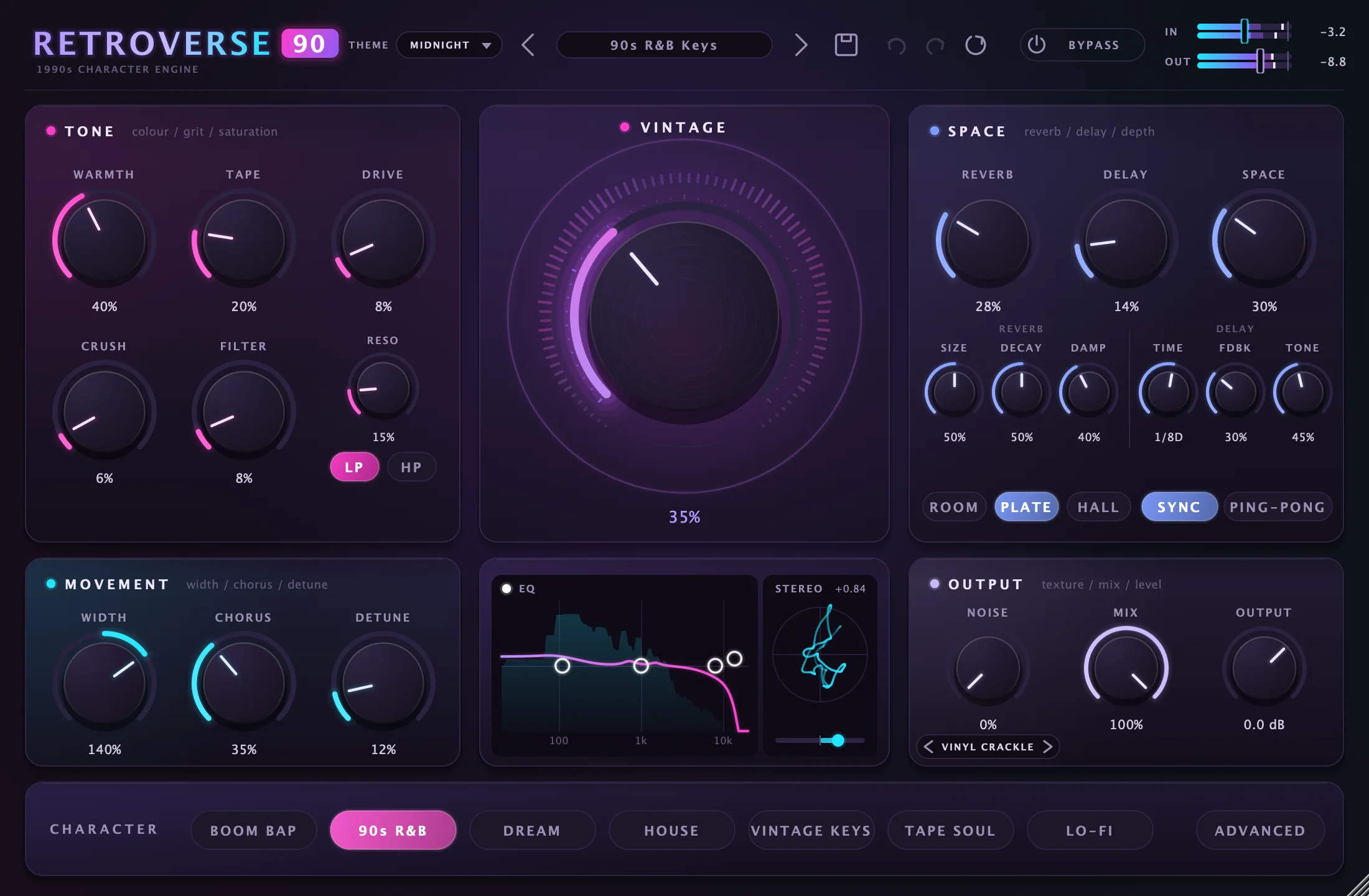
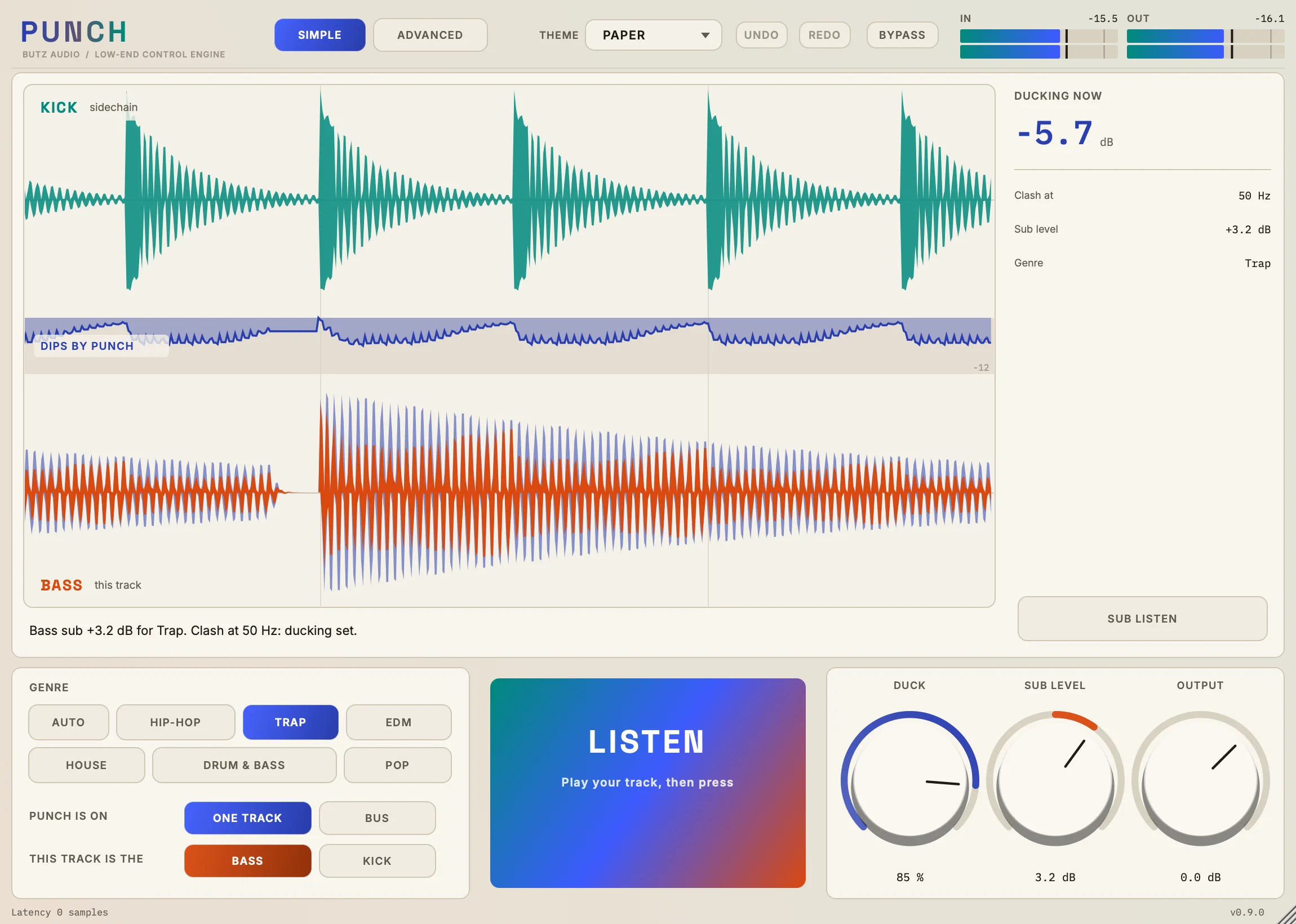
The RETROVERSE 90 plugin interface in the Midnight theme, with Tone, Vintage, Space, Movement, EQ, Stereo and Output panels above a row of character buttons.PUNCH on its Simple page in the Paper theme: kick and bass waveforms on a live screen, the dips PUNCH makes between them, genre buttons, a large LISTEN button and three knobs.

Products

Two plugins. One clear job each.

1990s Character Engine

RETROVERSE 90

One plugin. Endless character.

RETROVERSE 90 is a creative multi-effect processor designed to bring the character, warmth, texture, and atmosphere of the 1990s into modern music production.

7
character modes
14
factory presets
3
themes

$39 one-time

See RETROVERSE 90

Low-End Control Engine

PUNCH

Make your kick and bass work together.

PUNCH is a sidechain low-end processor for producers. It listens to your kick and bass, carves out the frequencies they fight over, and shows you exactly what it is doing on a live screen.

10
factory presets
7
themes
0
samples of latency by default

$39 one-time

See PUNCH

Key features

Make your sound unforgettable.

1 press

Kick and bass, sorted

PUNCH's LISTEN finds where they clash, sets the ducking and balances the subs.

Live

See every dip

PUNCH draws your real kick and bass on one clock, with a line that falls each time it cuts.

±1 dB

Character, not just volume

RETROVERSE 90's Vintage knob is loudness-matched, so what you hear is the tone changing.

Your look

Make it look like yours

RETROVERSE 90 has 3 themes and PUNCH has 7. Each changes the whole interface, and the sound stays the same.

Customize

Make it yours.

Both plugins come with themes that change the look of the whole interface, never the sound.

Theme

RETROVERSE 90 in the Midnight theme

Inside PUNCH

Make your kick and bass work together.

Press LISTEN while your track plays. PUNCH finds where the kick and bass clash, sets the ducking and balances the subs.

PUNCH on its Simple page in the Paper theme: kick and bass waveforms on a live screen, the dips PUNCH makes between them, genre buttons, a large LISTEN button and three knobs.

Live screen

See the dips, not just a meter.

Your real kick and bass waveforms, one above the other on the same clock, the way they look in a playlist. A line between them falls every time PUNCH cuts.

  • Follow a kick hit straight down and see its dip line up with it
  • See what was taken out as a paler edge around the signal that ducks
  • Get a clear message when the sidechain isn't reaching the plugin
Every Live screen detail explained

Inside RETROVERSE 90

Give your productions a new dimension.

Six sections, one signal path. Pick a section to see what it does to your sound.

The RETROVERSE 90 plugin interface in the Midnight theme, with Tone, Vintage, Space, Movement, EQ, Stereo and Output panels above a row of character buttons.

Tone

Warmth up front. Grit where you want it.

Six stages that take a clean signal from polished to played-out: low-mid body, tape, analog drive, sampler crunch and a resonant filter.

  • Fatten thin synths and keys without turning the low end to mud
  • Dial in the crunch of a 12-bit sampler for breaks and loops
  • Sweep the filter for dusty, muffled intros or thin telephone tones
Every Tone detail explained

RETROVERSE 90 before and after

Hear the difference.

Press play, then switch between Dry and Processed. Both takes run in lockstep, so the music never jumps.

All 14 presets

90s R&B Keys

Silky, wide keys with a gentle micro-detune and plate.

Every processed clip is an unedited render from the RETROVERSE 90 engine. The source is one synthesized test phrase of plucked notes, kick and hats, so these clips show how each preset treats the same material. Preset names describe their intended instrument, not this source.

Compatibility

Know what works before you buy.

Both plugins are being prepared for macOS. Windows is in testing for RETROVERSE 90 and planned for PUNCH. Each product page lists exactly what has been checked.

RETROVERSE 90

macOS
VST3, Audio Unit (AU), Standalone
Windows
In testingVST3 is running on Windows 11 in testing. Windows is not available yet.
Full list

PUNCH

macOS
VST3 and Audio Unit (AU)
Windows
PlannedWindows is not available yet.
Full list

Why BUTZ AUDIO

Creative audio tools. No compromises.

No decorative controls

If a knob or a reading is on screen, it does something real. PUNCH's screen stays dark rather than draw a signal that isn't there.

Measured before it is described

Automated suites of 203 checks for RETROVERSE 90 and 424 for PUNCH cover latency, gain staging and stability. This site says what has been tested and what hasn't.

Light on your session

About 2% of one Apple M2 core for RETROVERSE 90 with every effect at maximum, and about 0.5% for PUNCH at its default settings.